Break down AI spend
Breakdown turns your AI spend into a table you can split whichever way you need. Use it for a monthly report, or to find out where a jump in spend came from.
You need AI spend switched on for your organisation — ask your Flowstate contact.
Split spend
- Go to Insights → Agent insights → Breakdown.
- Choose the period.
- Under Aggregate by, choose what to split spend by: Projects, Initiatives, Objectives, Providers, Teams, Team members, Systems, Function, Geography or Employment type.
- Sort by Cost or Sessions.
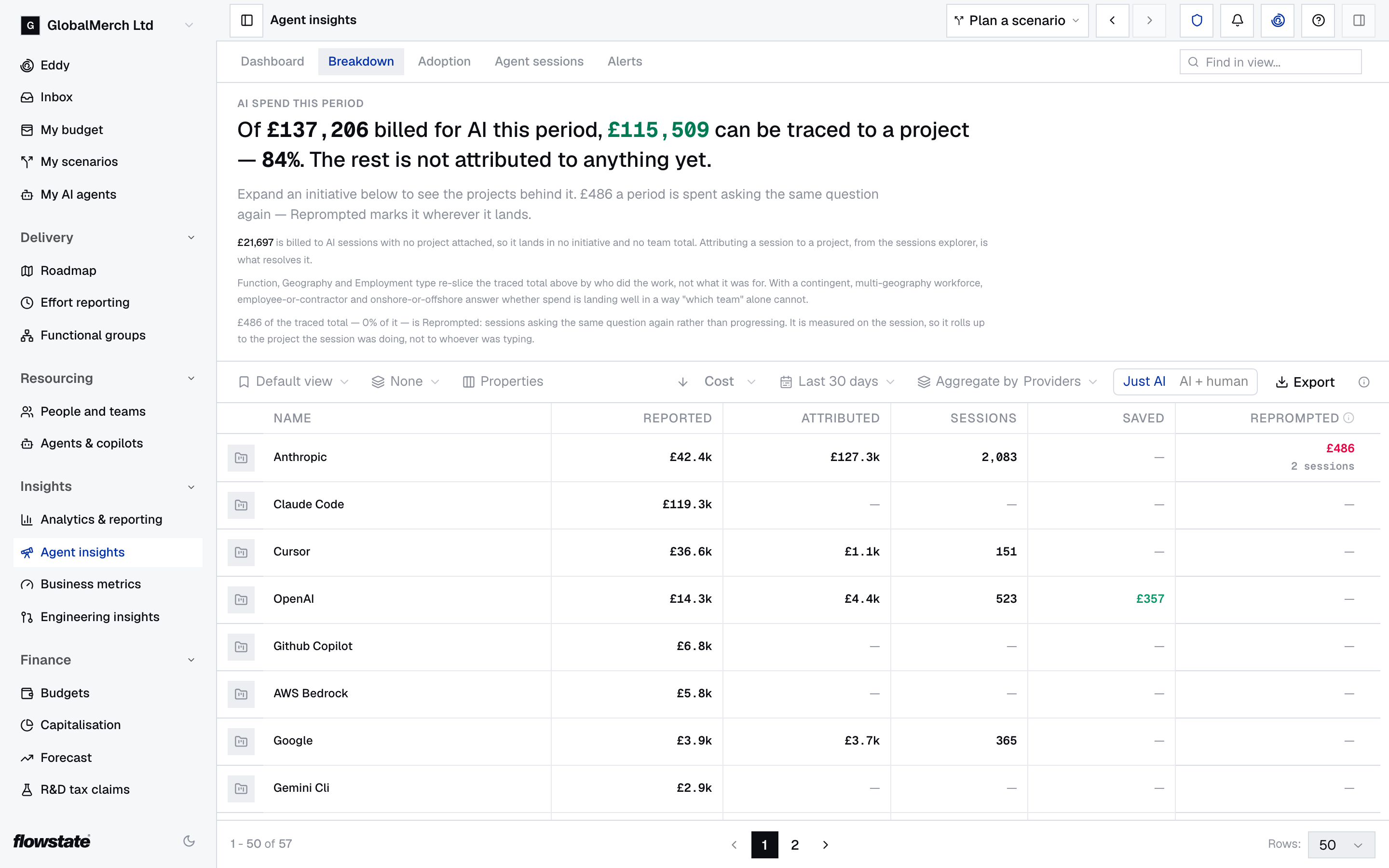
The columns change with what you split by:
| Column | What it shows |
|---|---|
| Reported | What the provider billed |
| Attributed | The cost of logged AI sessions |
| Sessions | How many AI sessions there were |
| Saved | What Flowstate saved by sending work to a cheaper model |
| Reprompted | Spend on sessions that asked the same question again |
| Forecasted | The initiative’s AI budget. Initiatives only. |
| Per unit | Cost per unit of output, from the team’s business metric. Projects only. |
Compare AI with the people doing the same work
- Under Aggregate by, choose Projects, Initiatives or Objectives.
- Switch Cost basis from Just AI to AI + human.
- Read the extra columns: People is the cost of effort logged against the same work, Total adds it to the AI spend, and AI share is the part that went on AI.
Drill into an initiative
- Under Aggregate by, choose Initiatives.
- Select an initiative to see its projects.
- Select a project to see what kind of work its sessions were doing.
- To see the sessions themselves, select the Open sessions arrow beside a name.
With any other choice under Aggregate by, select a row to open its sessions in Agent sessions. Drilling in needs AI spend attribution.
Export the spend
- Choose the period.
- Select Export. An Excel file downloads.
You need access to detailed financials to export — ask your Flowstate admin.
Rows you might not expect
- Pending attribution, at the bottom, is spend on sessions that don’t have a project yet. Give them one in Agent sessions, or ask people to do it themselves on My sessions.
- Unlinked — … is someone at the provider Flowstate couldn’t match to a person. Check that their work email in Flowstate is the email they use with the provider.